.jpg)
Modern businesses don’t struggle with document storage they struggle with document intelligence. While NetSuite document management systems organize files efficiently, teams still spend valuable time reading, sorting, and matching documents manually.
With the latest enhancements to SkyDoc, Tvarana introduces applied NetSuite AI capabilities that transform static documents into intelligent assets. Through AI Summary and Intelligent Document Classification, we’re bringing practical, secure, and workflow-ready AI in ERP directly into NetSuite.
Traditional ERP systems are excellent at storing documents. But storage alone doesn’t reduce workload. Teams still have to interpret, classify, and attach documents manually. This section explores why intelligence, not just organization, is the next evolution in NetSuite document management.
Even today, users often:
NetSuite stores your files. SkyDoc along with AI helps you understand and act on them instantly.
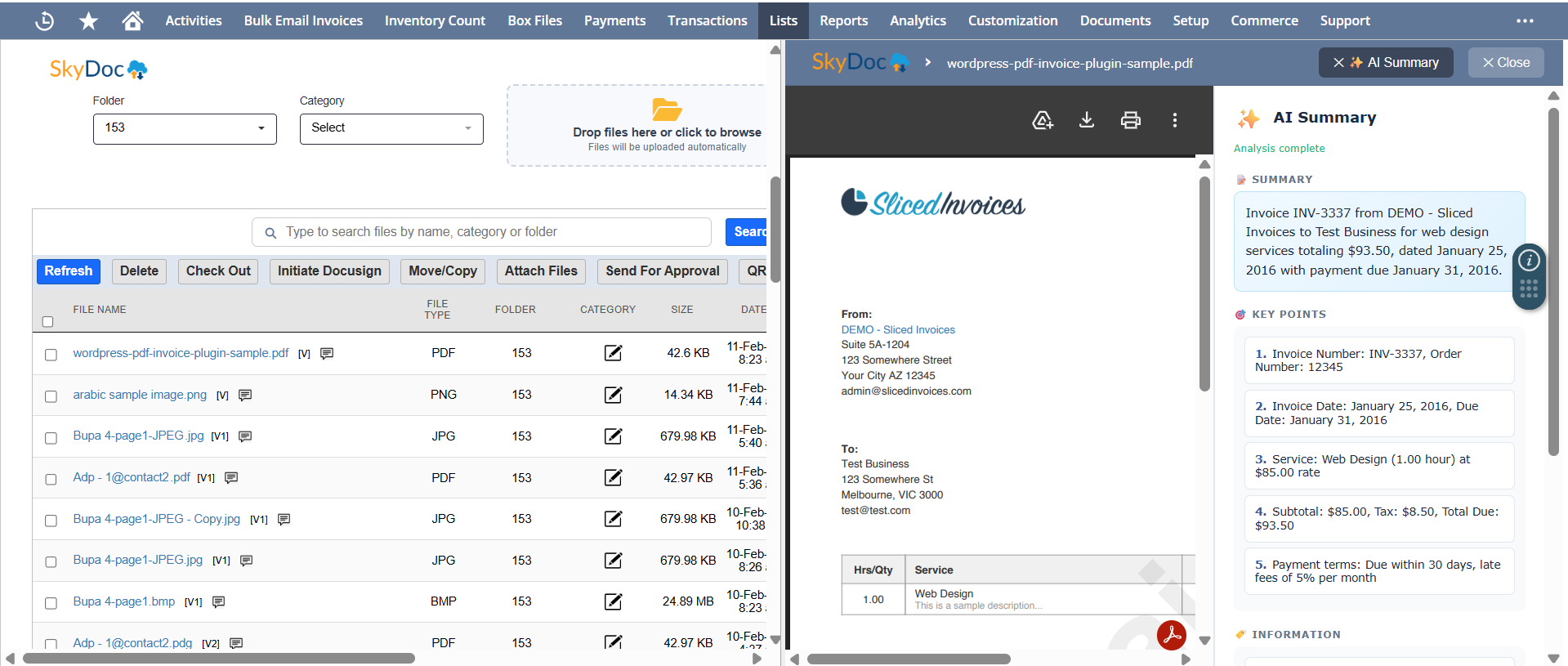
AI Summary introduces real-time document intelligence directly into your NetSuite interface. Instead of reading every page manually, users can generate concise summaries within seconds without leaving their workflow.
AI Summary is designed to eliminate repetitive document reading. With a single click, SkyDoc generates a readable, structured overview of any file stored inside NetSuite. It appears instantly within the split preview panel.
Instead of scrolling through PDFs or downloading attachments, users get immediate clarity.
The feature is intentionally simple from a user perspective, but intelligently engineered behind the scenes to optimize performance and resource usage.
Step 1: Admin Enables AI Features: AI (Beta) is activated within SkyDoc Setup.
Step 2: User Opens Split Preview: A document is selected within NetSuite.
Step 3: Click AI Summary: The system analyzes the document via the configured AI engine.
Step 4: Summary Appears Instantly: A concise explanation displays inside the preview panel.
Step 5: Smart Caching Prevents Repeat Calls: The summary is stored in file metadata, avoiding additional AI requests.
AI Summary is not just a convenience feature. It directly improves productivity and reduces cognitive load across departments.
This is practical AI in ERP that improves workflows without disrupting them.
To understand its value, consider how teams interact with long-form documents today. AI Summary changes that experience dramatically. For example, when reviewing a vendor contract, users can instantly see:
Instead of reading 12 pages, they understand the essentials in seconds.
If AI Summary helps users understand documents faster, Intelligent Document Classification ensures those documents are processed accurately from the moment they enter the system.
Document intake is one of the most time-consuming aspects of ERP workflows. Before any transaction is completed, documents must be identified, entered, matched, and attached correctly.
Traditional processes involve:
This increases error rates and slows approvals.
SkyDoc’s AI-powered classification module automates the entire document lifecycle, from upload to record attachment within NetSuite. Here’s how the workflow unfolds:
Users drag and drop documents (PDF, PNG, JPG) directly into NetSuite.
The system analyzes the document and automatically extracts structured data such as:
Using secure queries within NetSuite, the system:
The document is stored in SkyDoc cloud storage, is linked to the appropriate NetSuite record, and saved with structured metadata. All in a single unified workflow.
.png)
The classification engine is designed to support a wide range of business-critical documents across departments.
More than 15 document types are supported with an additional expansion planned.
Enterprise adoption requires more than automation. it requires security and scalability. SkyDoc’s AI features are built with those principles at the core.
The architecture includes:
This ensures enterprise-grade AI in ERP without compromising compliance.
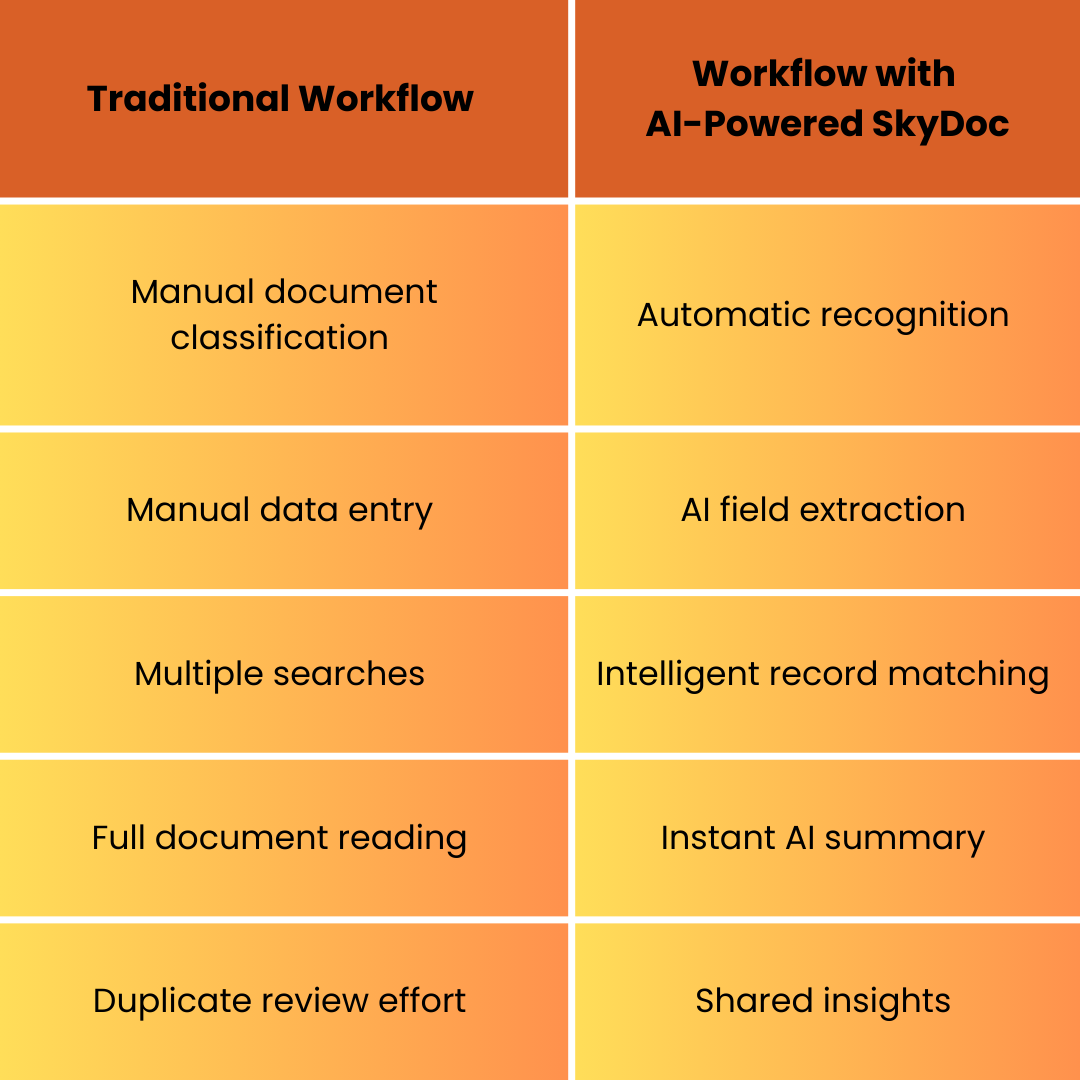
The real value of NetSuite AI becomes visible when comparing traditional workflows with AI-enhanced processes.
ERP systems are evolving beyond transactional systems into intelligent operational platforms. Document intelligence is a foundational part of that transformation. With SkyDoc powered by NetSuite AI, documents are no longer passive attachments. They become:
This is the next phase of AI in ERP where documents actively contribute to decision-making.
AI should not complicate workflows. It should remove friction. With AI Summary and Intelligent Document Classification, SkyDoc is redefining NetSuite document management by embedding intelligence directly into everyday processes.
Your ERP already manages transactions. Now, with AI-powered SkyDoc document management, it can understand documents too.
If this sounds interesting and you'd like to know if this is something that your team can use, book a consultation with our team of experts.



Tvarana is an award-winning
Oracle NetSuite Consulting Firm
and an SDN partner.
info@tvarana.com