Summary:
AI can be surprisingly helpful at generating SuiteScript 2.1 structure, suggesting API mappings, drafting tests, and helping document changes. What it cannot do is audit generated code and verify that your business process still works, or that a migrated script is ready for production. Safe NetSuite AI-assisted code conversion combines AI-generated work with manual developer review, sandbox testing, security checks, workflow validation, and business-owner approval.
Key Takeaways:
AI can generate code quickly, but NetSuite admins often need answers to a different question: can AI-assisted code protect the business process it supports? This is because converting JavaScript and migrating a NetSuite customization are not the same job.
That distinction is very important for SuiteScript migration. A script may approve vendor bills, update inventory, call a RESTlet, or feed month-end reporting. NetSuite AI-assisted code conversion can speed up the mechanical work here, but it cannot confirm that a finance role still has the right access or that an external system will accept the new response.
That’s why the final migration needs developer review, sandbox testing, and business-owner sign-off. In this article, we explain where AI can help, where admins should be cautious, and how to evaluate an AI-assisted SuiteScript migration approach before approving production changes.
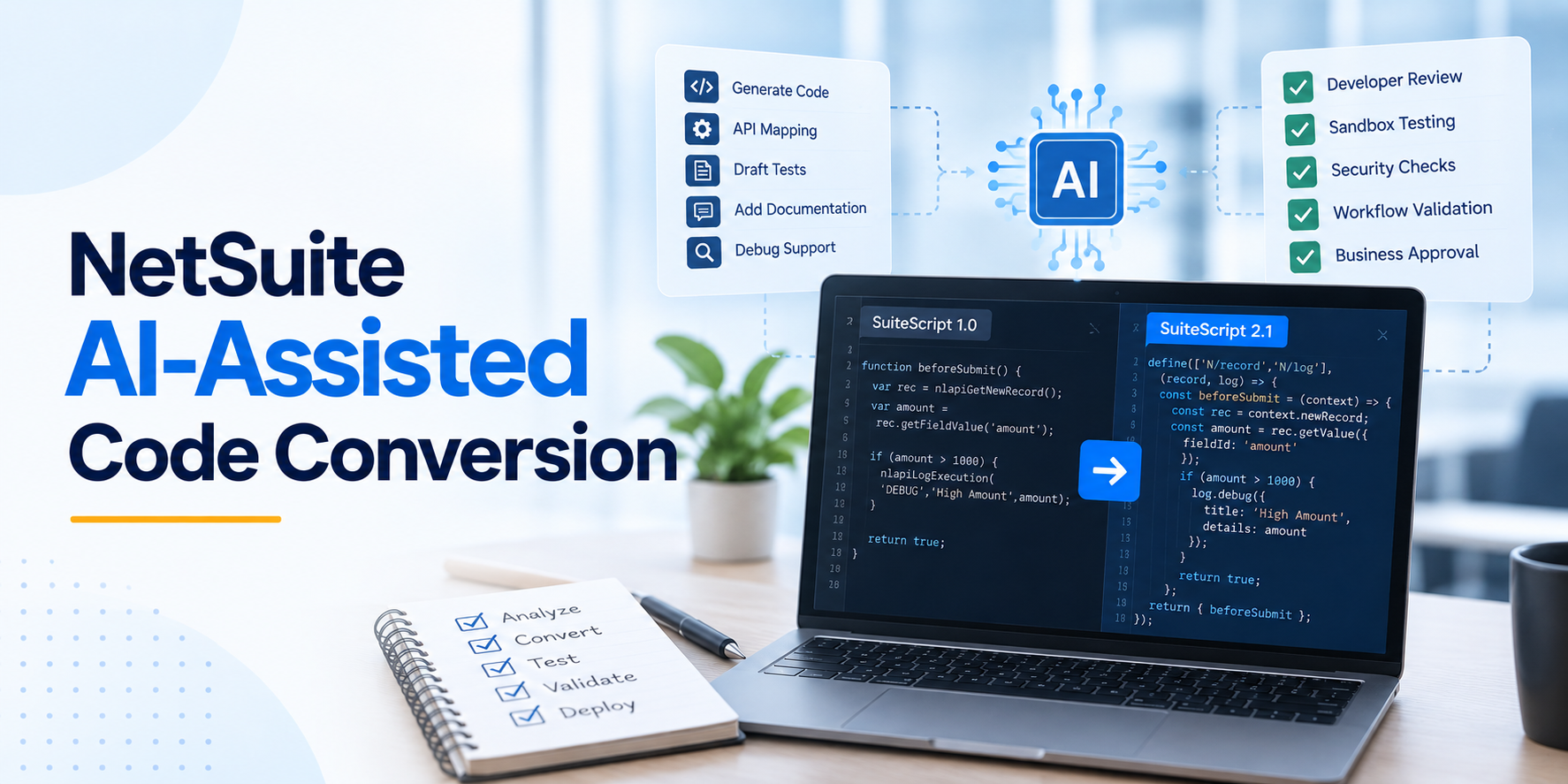
NetSuite AI-assisted code conversion is best thought of as a development accelerator. The AI can take work that would otherwise require repetitive coding and give a developer a useful starting point. That can include building the structure of a SuiteScript 2.1 file, suggesting replacement APIs, explaining unfamiliar legacy logic, creating comments, or drafting tests.
NetSuite’s SuiteCloud Developer Assistant is designed for this kind of development work.
There are parts of a SuiteScript migration that are highly suitable for AI assistance because they involve repetitive structure, analysis, or documentation.
For example, AI can help with:
SuiteCloud Developer Assistant can also generate boilerplate code aligned with NetSuite development practices and is optimized for JavaScript and TypeScript in SuiteScript files. That makes it valuable during a migration backlog, especially when teams need to process many scripts with limited development capacity. The key concept here is “assist.” Generated code should first enter a review process before a deployment queue.
SuiteScript code is often tied to records, roles, permissions, saved searches, workflows, subsidiaries, integrations, and business rules. A lot of this can be business-critical, and while AI can digest syntax, admins and developers need to review and approve the output.
A NetSuite developer should review:
This review matters because SuiteScript migration can fail in practical places. Suppose an AI tool produces code that is syntactically valid and appears to reproduce the original logic. That does not tell you whether a finance user has the permissions required for the new execution path. It also does not tell you whether an external application accepts the RESTlet response or whether a scheduled script behaves correctly once data from another subsidiary enters the process.
These are not edge cases around the code. They are part of whether the migration works.
It is important not to treat every SuiteScript migration as the same kind of conversion task. SuiteScript migration has two common paths: SuiteScript 1.0 to 2.x or 2.1, and SuiteScript 2.0 to 2.1. Each path has technical details and challenges that AI should not handle without review.
When moving from SuiteScript 1.0, API mapping becomes a major issue. This is because SuiteScript 1.0 functions and objects do not always map directly to SuiteScript 2.x modules and methods. That means a conversion cannot always be handled by replacing one function name with another. This is especially important when the original script has accumulated years of account-specific logic.
A 2.0-to-2.1 migration has a different issue to solve. Here, much of the SuiteScript API is already similar, and the bigger concern is what changes with runtime behavior when the code runs under SuiteScript 2.1. SuiteScript 2.1 changes behavior around strict mode, invalid JSON parsing, error object properties, promises in server scripts, reserved words, RESTlet return types, and other details.
These differences can reach directly into integrations and affect business logic. For example, JSON received from middleware may behave differently in a parsing path, or a RESTlet response consumed by an ecommerce or payment platform may need to be revalidated.
NetSuite has multiple SuiteScript types, so there is no single migration approach that works equally well for every script. AI can speed up parts of the process, but the migration still needs a clear review, testing, and deployment path around it.
The key focus of this migration workflow is to let AI take some of the manual conversion work off the team’s plate without handing over responsibility for the migration itself.
There is another side to AI-assisted conversion that is easy to overlook: what information you give the AI, and what happens to its output afterward. NetSuite AI-assisted code conversion should follow practical domain-specific AI governance principles.
This does not need to turn the migration into a slow approval exercise. It simply means keeping sensitive business data, logic, and production decisions under the same kind of control you would expect elsewhere in your NetSuite environment.
AI-generated code should be treated as unverified until someone has reviewed it. The goal of governance is to make sure the speed gained during conversion does not introduce a new security or production risk.
AI is changing how SuiteScript migration work begins. It can draft, explain, refactor, and document. But that first pass is never the part that determines whether a migration is safe for production. Admins need to know whether the new script integrates well with the APIs, records, roles, governance limits, and business rules that surrounded the old one.
That is why the best use of NetSuite AI-assisted code conversion is not to replace people in the migration process. It is to move their attention toward the decisions that actually require expert knowledge.
Tvarana helps NetSuite teams connect those pieces into one practical migration approach. We help businesses with their NetSuite AI-assisted code conversion plans through our SuiteScript expertise, so your team can move forward with clarity.
If you are evaluating a SuiteScript migration backlog, ask us about our AI-assisted migration approach.



Tvarana is an award-winning
Oracle NetSuite Consulting Firm
and an SDN partner.
info@tvarana.com