Quick Answer: NetSuite's native workflow engine handles structured, transaction-based approvals well, such as purchase orders, expense reports and vendor records. But for document-centric review and sign-off, like contracts and signed agreements, it falls short on visibility, version control, and external access. SkyDoc closes those gaps inside NetSuite, adding a simple approval interface, audit trails, email reminders, a secure external portal, and DocuSign e-signatures.
Quick Takes:
The list of documents that a business has to handle is limitless. Adding to it, the unique demands for dealing with each document add to the chaos. While ERP helps, automated document management is a necessary requirement to ensure the highest efficiency among team members.
Only thoughtfully curated and integrated solutions have the potential to offer a quick, accurate and compliant document approval workflow. This guide introduces a solution that's tried, tested, and trusted by enterprises across industries. Read on to see how SkyDoc resolves the limitations of native NetSuite document approval.
NetSuite does offer native ways to route documents and records for approval, primarily through its workflow engine, SuiteFlow, and record-level approval routing. With these tools, organizations can build approval chains for transactions like purchase orders, expense reports, and vendor records, so that items move through defined review stages before they're finalized.
In practice, a native approval setup typically:
This works for structured, transaction-based approvals. But when it comes to document-centric review and sign-off (contracts, agreements, signed files attached to records), native NetSuite starts to show meaningful gaps.
While the feature may seem intriguing, there are certain shortcomings with NetSuite that can be rectified with a better and easier-to-use integration. But to value that, you must understand the limitations first:
SkyDoc by Tvarana is a natively integrated document management SuiteApp for NetSuite. It enhances document approval by simplifying the workflows and making them more accessible and transparent. Instead of relying on the complex SuiteFlow, it offers you a simple and user-friendly interface for quick and easy reviewing and taking action for approval or rejection (depending on the case). Internationally compliant with SOX and GDPR, SkyDoc also ensures secure document access within NetSuite.
One of the key limitations in native NetSuite is limited access for external stakeholders, like vendors, auditors or clients. This happens because standard external roles are restricted, and custom roles often miss key permissions. So businesses lean on internal teams to share files and coordinate approvals by hand.
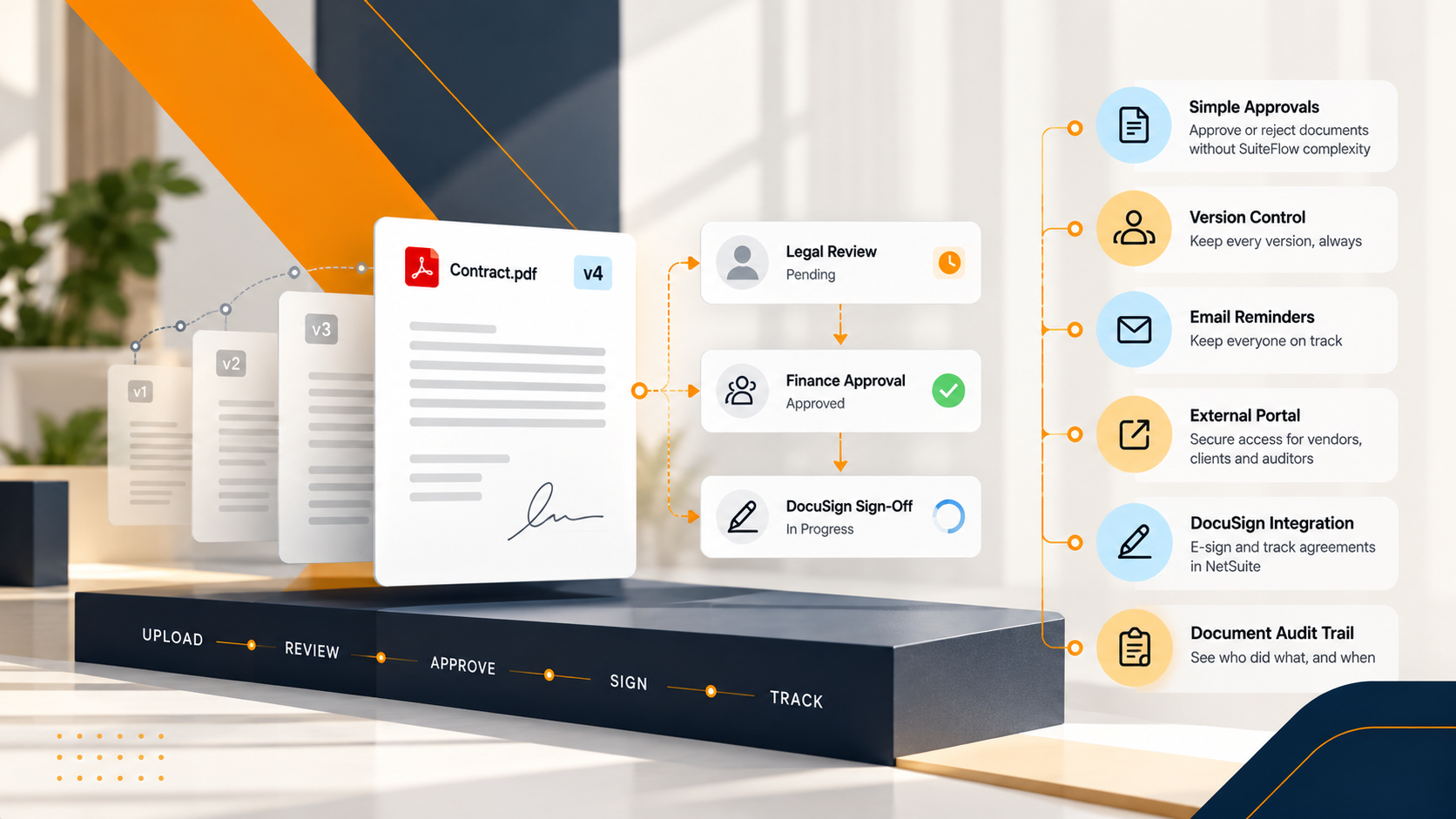
SkyDoc helps overcome this challenge by providing a secure external portal where authorized stakeholders can see only the documents that concern them. They can review files, approve or reject requests and complete sign-off actions without needing full NetSuite access. It reduces internal dependency, speeds up collaboration and maintains a complete audit trail for every action.
SkyDoc enables quick document approval or rejection both inside NetSuite (for internal users) and through a secure external portal (for stakeholders without a NetSuite license). These actions keep review fast and friction-free:
Approve Button: Allows instant approval of selected files to speed up the workflow.
Reject Button: Enables rejection of unwanted or incorrect documents directly from the interface.
Mark/Unmark All: Lets select or deselect all files in a list at once, so bulk actions save time.
Sign Button: Allows digitally signing selected files. Once signed, the system automatically updates the ‘Signed File Link’ column with a secure PDF link. Hence, businesses get fast, traceable and compliant approval processing.
Search Button: Helps quickly locate specific documents by entering keywords related to file names, so no one spends time manually browsing the folders for required files.
Upload Files Option: Redirects users to a dedicated upload page where files and folders can be managed efficiently.
Drag and Drop Upload: Allows uploading files easily using a pop-up interface that supports drag and drop or manual selection.
Folder and Category Assignment: During upload, users can assign files to specific folders and categories for better organization and accessibility for review.
New Folder Creation: Allows creating new folders directly within the portal for structured file storage and review.
Folder View Access: Simply requires a click on any folder to view all associated documents inside it.
Refresh Button: Updates the page with the latest uploaded files and changes in real time.
Navigation to Approval Records: Jumps back to the Approval Records page from any section for continuous workflow management.
Version Control: It ensures reviewers get to review the updated version of the file.
Audit Trail: Tracks every change to a file, so accountability is built in.
Email reminders: Senders and receivers are both updated with the email notification about the relevant proceeding to ensure proper workflow.
Built on the NetSuite platform and integrated with AWS S3, SkyDoc is a go-to solution for automated document management. Let us learn how the process is simplified and works here:
Internal approvers can review and approve or reject documents tied to NetSuite records, such as purchase orders, expense reports, and employee records, directly within NetSuite. The typical workflow:
SkyDoc comes integrated with DocuSign for the sign-off on relevant files, such as:
The workflow is the same as the NetSuite approval process. The document is sent, the receiver is notified, and every detail can be tracked, including opening, signing and completing the task.
Automated document management involves multiple aspects, including review and sign-off. Further, effective handling requires features like version control, audit trail, security, user-friendly interface, e-signature, and easy review for both internal and external stakeholders. SkyDoc delivers all of it by integrating NetSuite and DocuSign, built by Tvarana.
With a smooth review, approval, and rejection workflow, it fixes the gaps you hit using NetSuite alone, unifying storage, approval, and signing in one system.
So, if external approvals, missing version control, and the complexity of SuiteFlow are slowing you down, Tvarana welcomes you to set up a consultation call to explore our document management services. Get to know how we can be a potential integration to ease the workflow associated with NetSuite.



Tvarana is an award-winning
Oracle NetSuite Consulting Firm
and an SDN partner.
info@tvarana.com