Most teams don't think about NetSuite storage until something breaks. An invoice won't attach. A file upload fails silently. A colleague reports they can't access a document that was there yesterday. By that point, the issue is no longer just technical. It becomes operational.
Although NetSuite is a powerful ERP platform, its File Cabinet does not scale with the document volume that modern businesses generate. This native file management tool has certain limits. You need to fully understand the extent of those limits and how important they are for your day-to-day operations. When equipped with this information, you find yourself making a smarter choice about document management and storage.
NetSuite storage is capped by your service tier. Each tier sets a maximum File Cabinet allowance, and every account sits in one of four tiers:
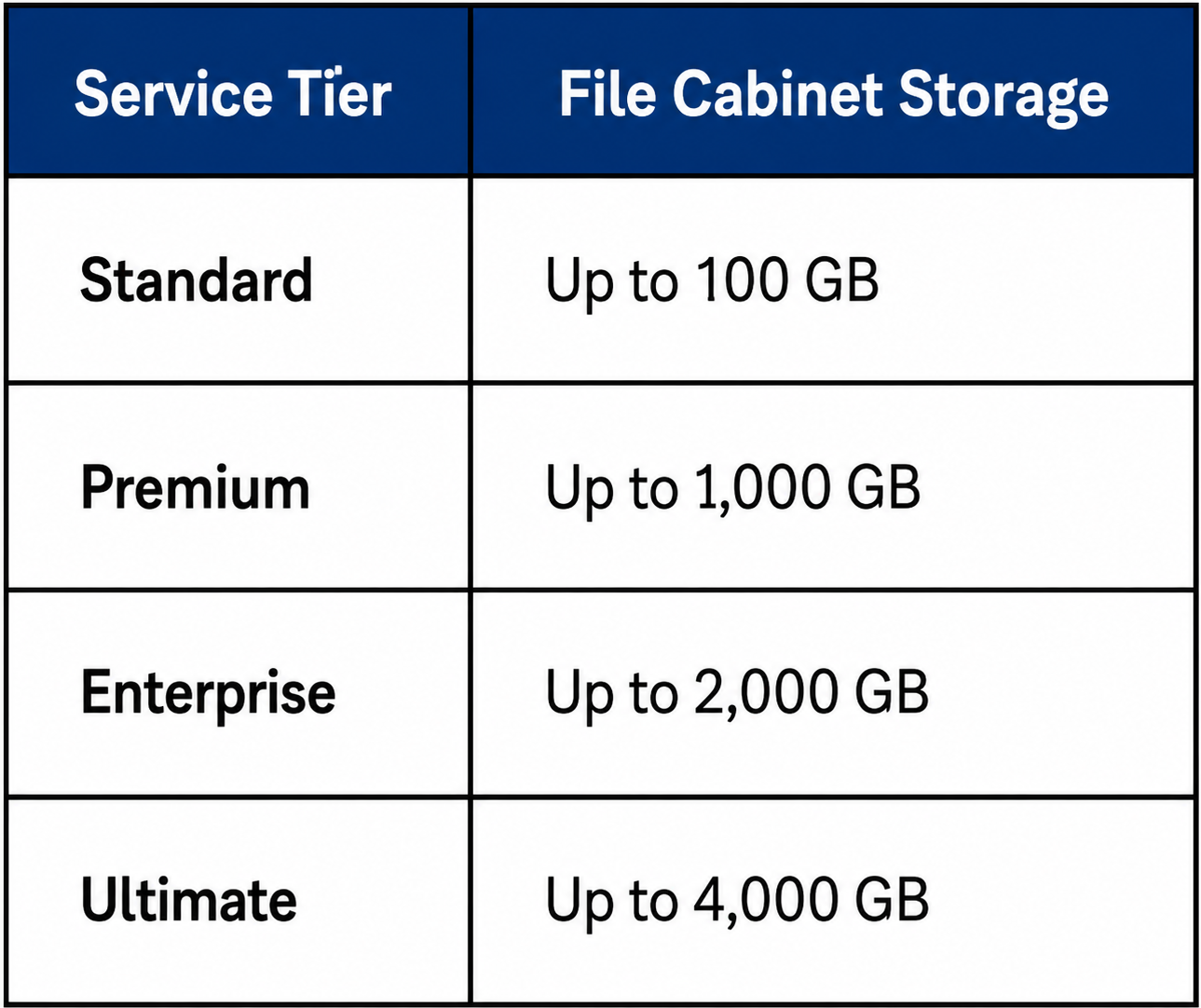
Everything your team attaches in NetSuite counts against that allowance: transaction documents, vendor bills, contracts, images, and templates.
There is a second limit that gets less attention. Drag-and-drop uploads into NetSuite are capped at 10 MB per file, and Oracle's own guidance is to keep any File Cabinet file at 100 MB or smaller. Large CAD files, high-resolution product images, and long PDFs are a poor fit either way.
Crossing the storage ceiling starts a clock. NetSuite shows administrators a banner message, sends an email notification, and grants a 90-day grace period for the File Cabinet storage limit specifically. Within that window, the account either reduces usage or moves up a service tier.
Document management in the cloud for NetSuite users really means that your documents should live in a scalable, secure cloud infrastructure, not inside your ERP's internal storage layer.
NetSuite's File Cabinet is technically cloud-hosted and is meant to be used by companies of all sizes. But it lacks the architecture that enterprise file management actually requires:
When these elements are missing, teams compensate manually. Low-value tasks engage more time and there is more room for human error.
The consequences aren't always immediate or obvious. Here's how storage pressure typically shows up in practice:
They're the predictable result of scaling a business on storage infrastructure that wasn't designed for enterprise file management.
Disciplined file hygiene can push the NetSuite storage ceiling back by months. These practices come straight from how the File Cabinet actually behaves:
These practices work, and teams that follow them buy real time. What they cannot change is the direction of travel: document volume compounds while the allowance stays fixed, and cleanup hardens into a permanent IT chore. Tvarana's guide to dealing with file restrictions in the NetSuite File Cabinet breaks down where the native limits bite hardest. The longer-term answer is to move file storage out of the File Cabinet entirely, which is what SkyDoc was built to do.
SkyDoc, built by Tvarana, is a native NetSuite SuiteApp that replaces the File Cabinet's limitations with enterprise-grade document management and storage powered by Amazon S3. It's the top-rated document and file management solution on SuiteApp.com, and the design philosophy is simple: storage should work for your team, not against it.
SkyDoc changes the storage math in three ways.
First, capacity. SkyDoc moves file storage out of the File Cabinet and into Amazon S3, so documents stop counting against your service tier allowance. Storage becomes effectively unlimited, and you pay only for the space you actually use.
Second, file size. Because files live in S3, the File Cabinet's per-file caps no longer apply. Teams can store CAD files, high-resolution images, videos, and long PDFs without splitting or compressing them.
Third, continuity. Files stay attached to the NetSuite records they belong to, and teams keep working inside NetSuite. Nothing about the day-to-day changes except that storage stops being a constraint.
SkyDoc also covers document versioning, approval workflows, external collaboration, and file preview.
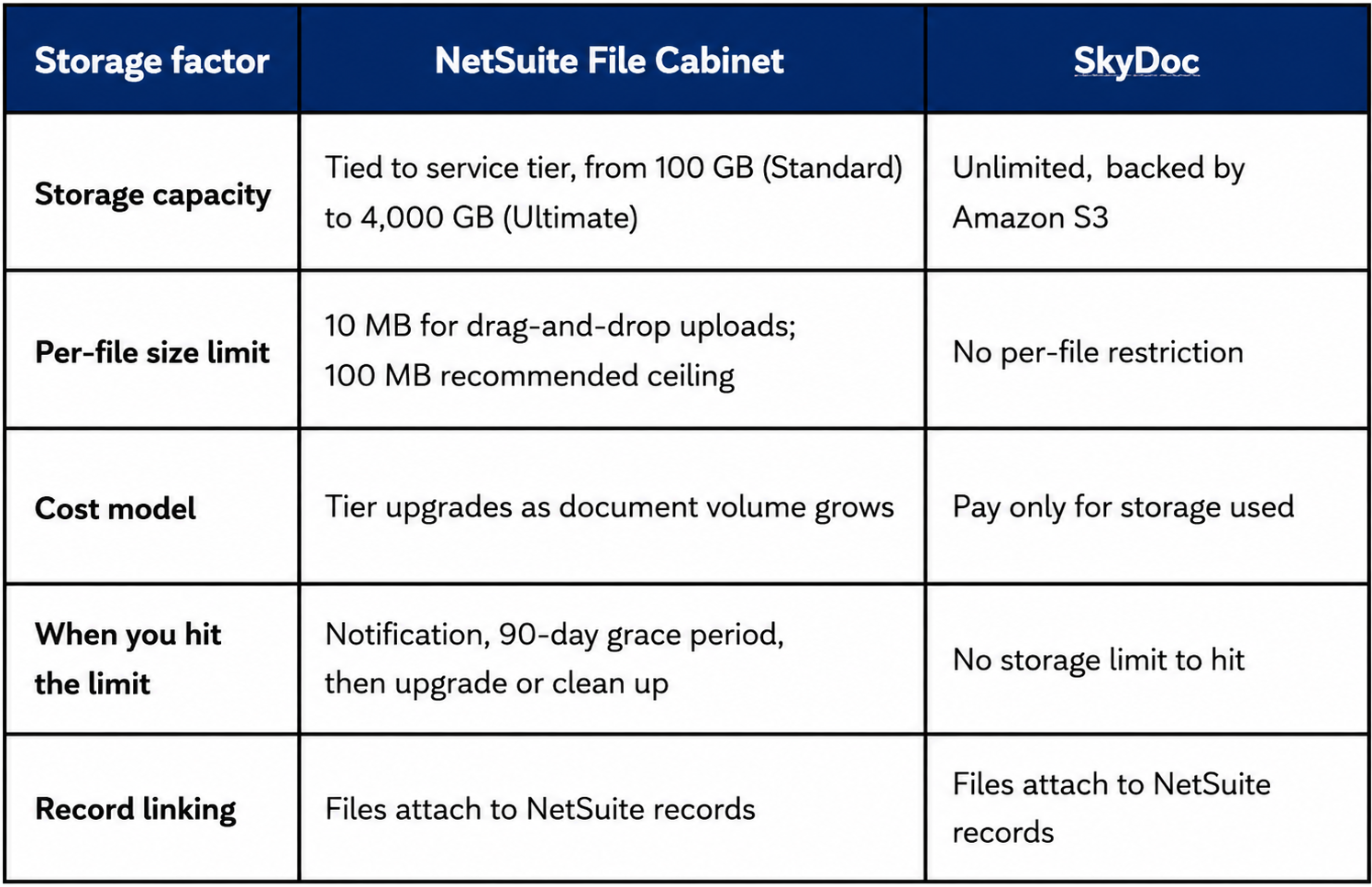
The difference is structural. The File Cabinet allocates a fixed block of storage and forces a tier decision when you outgrow it. SkyDoc removes the allocation entirely, so storage grows with document volume and the ceiling never arrives.
SkyDoc serves organizations across industries: manufacturing, healthcare, retail, eCommerce, engineering, education, professional services, and more. But the teams that feel the most immediate impact are:
If any of these teams are currently emailing documents, using shared drives as a workaround, or manually cleaning up the File Cabinet on a regular basis, that means that the current NetSuite storage setup is costing more than it should.
SkyDoc has also expanded beyond storage into AI-powered document intelligence. With the latest additions, AI Summary and Intelligent Document Classification, documents uploaded into NetSuite can now be automatically read, classified, and matched to the right records.
A vendor invoice arrives by email. In the File Cabinet workflow, an AP clerk downloads it, renames it, and manually attaches it to the bill record. With SkyDoc's Intelligent Document Classification, the same document is auto-identified, extracted, matched, and filed in seconds.
This moves document management in NetSuite from a manual, reactive task to an intelligent, proactive one.
NetSuite storage has real limits, and most organizations encounter them at the worst possible time: during a fast close, an audit, or a period of rapid growth. The File Cabinet works well enough at a small scale, but it was never designed to be an enterprise document management and storage solution.
The numbers are fixed. Standard tier accounts get 100 GB, drag-and-drop uploads cap at 10 MB per file, and crossing the limit starts a 90-day countdown. Teams that know these figures ahead of time can plan calmly. Teams that discover them during an audit make storage decisions under pressure. SkyDoc removes the ceiling altogether by moving file storage to Amazon S3 while keeping every document attached to its NetSuite record.
If your team is approaching the ceiling on NetSuite storage, start by checking current usage at Setup > Company > View Billing Information. Then weigh the two paths: a service tier upgrade, or a storage offload like SkyDoc that scales with your document volume. Learn more about SkyDoc and assess whether it fits your environment.



Tvarana is an award-winning
Oracle NetSuite Consulting Firm
and an SDN partner.
info@tvarana.com